
Billing and plans
Billing (at the bottom of the navigation) shows your workspace’s plan, what it uses, and the plans available. Only workspace admins change the plan.
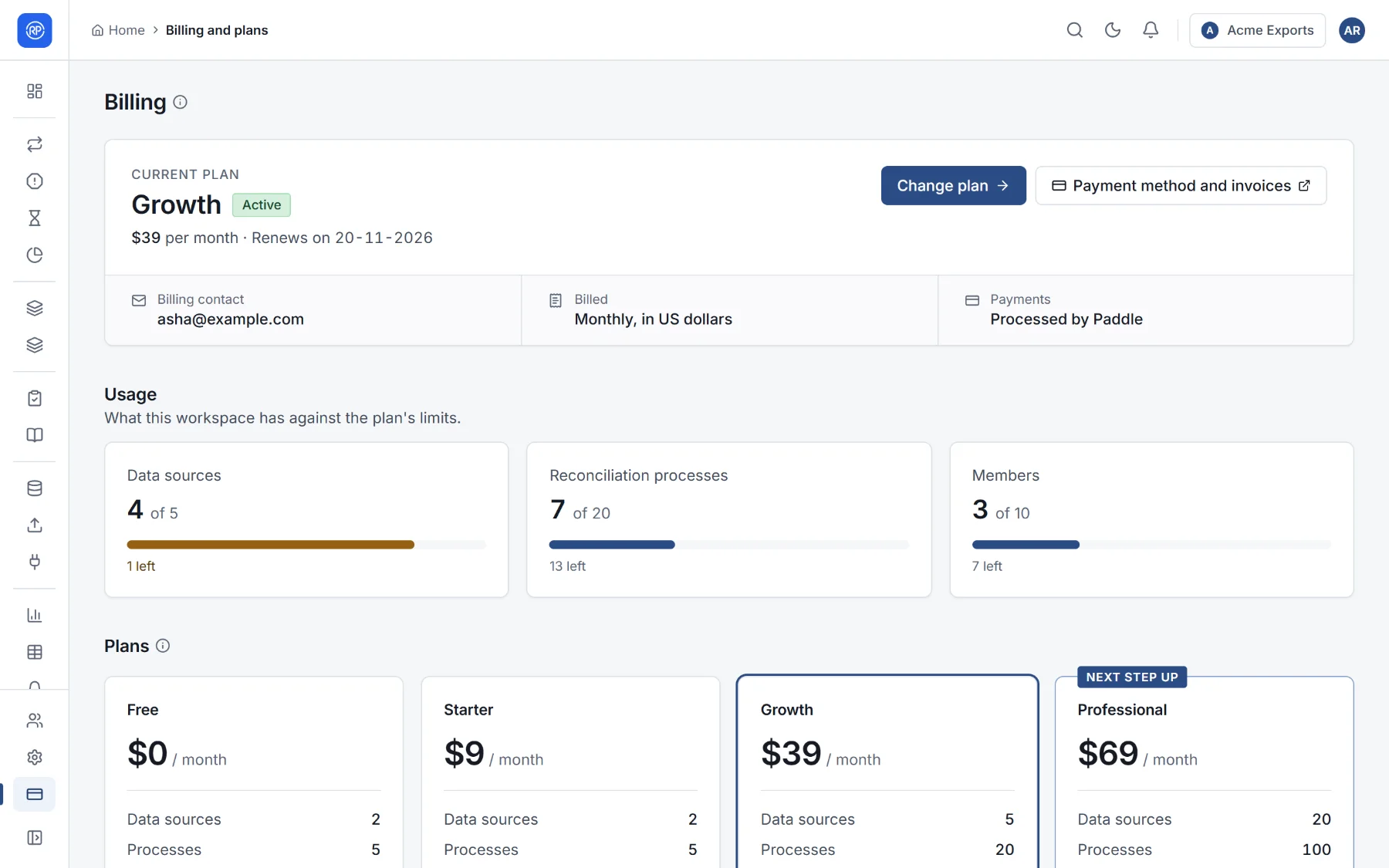
Your plan
Section titled “Your plan”The top shows the plan, its status (Active, Trial, Payment overdue or Cancelled), the price and when it renews, the billing contact, and Payment method and invoices, which opens the payment portal.
What this workspace has against the plan’s limits: data sources, reconciliations and members, each with a bar.
Plans compared
Section titled “Plans compared”The table compares the plans: their price per month, how many data sources, reconciliations and members they allow, how many instant reconciliations each person may run in 30 days, and which features they include:
- Exports: results and reports as CSV and Excel;
- Alerts: email and webhook alerts on failed runs and large differences;
- Scheduled runs: reconciliations that run on a schedule;
- API access: API keys for other systems.
Changing plan
Section titled “Changing plan”- Upgrading applies as soon as the payment is confirmed, usually within a minute. You pay the difference for the rest of the month.
- Moving to a smaller plan or cancelling is done in the payment portal (Switch in the payment portal).
Invoices
Section titled “Invoices”Invoices are in the payment portal, with the payment method. Each invoice is also emailed to the billing contact. Payments are handled by Paddle, our payment provider.