
Writing rules
Many decisions in RefinePoint are made by rules: which rows to leave out, how to work out a field, which breaks are bank charges, which journal to raise, who gets a break. A rule is a short sentence that reads like English:
narration contains 'SMS' and amount is less than 500You do not need to know any programming to write one. You can build it by picking from lists, and RefinePoint writes the sentence for you, or type it yourself.
Where rules are used
Section titled “Where rules are used”| Where | The rule decides | Example |
|---|---|---|
| Leave out rows | Which rows to ignore | column "Narration" contains 'OPENING' |
| Preparation steps | Which rows a step applies to, or a new column’s value | [upper case] [trim] column "Ref No" |
| Fields | A field worked out from columns | column "Credit" - column "Debit" |
| Checks | Which records are flagged, or a figure from totals | amount is greater than 500000 and party is not present |
| Reason codes | Which breaks get the code | narration contains any of 'SMS', 'CHG' |
| Workflow rules | Who gets a break, its due date, its label | party is 'Tata Steel' |
| Journal rules | Which records raise which journal | reason is 'BANK_CHARGES' |
| Calculated results | A value per group | A_igst - B_igst |
There are two kinds of rule: a condition is true or false (is this a bank charge?); a value works something out (what is the clean reference?). The editor knows which one each place needs.
Building a rule from sentences
Section titled “Building a rule from sentences”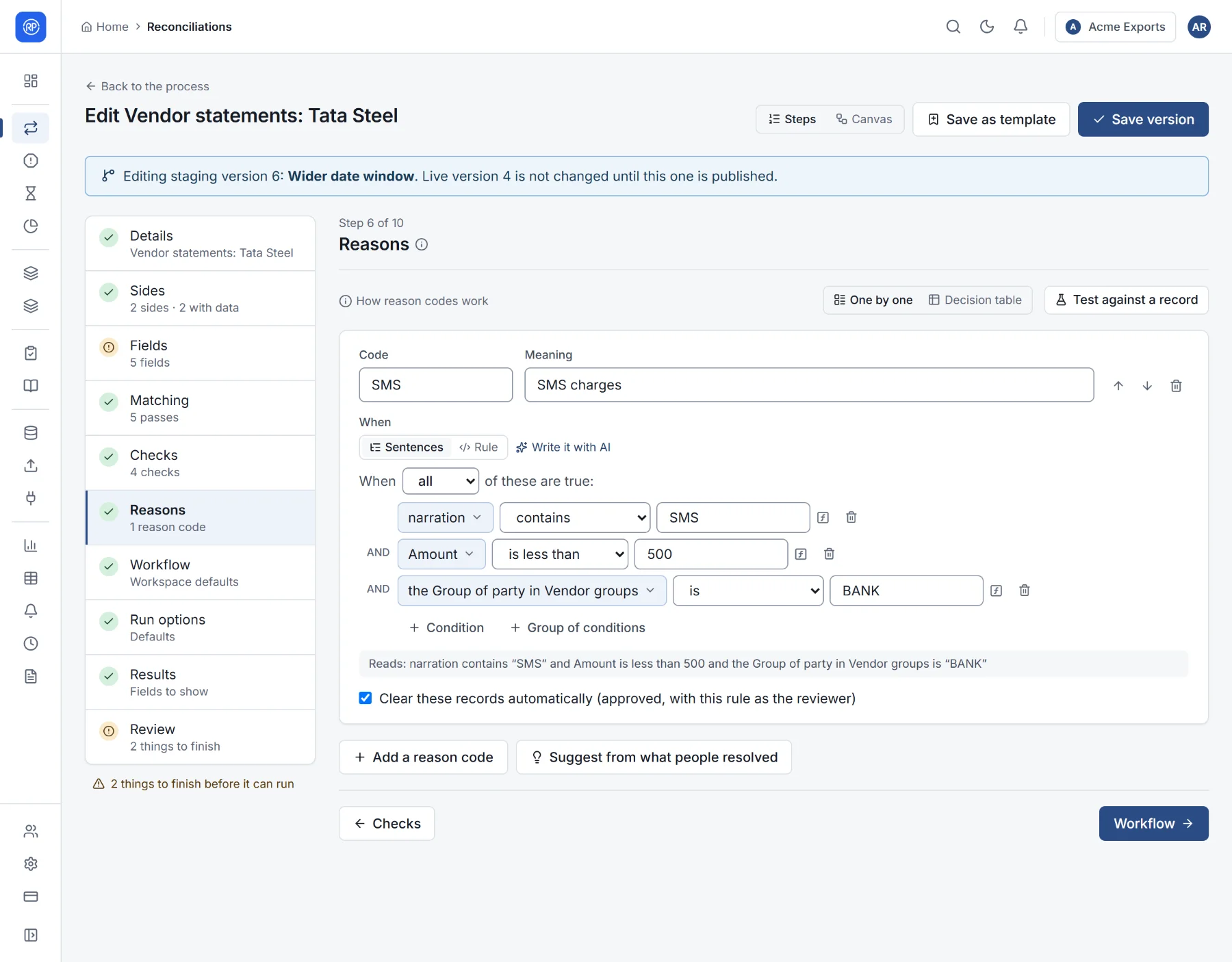
The sentence builder is the easiest way in.
- When all / any / none of these are true: choose whether every sentence must be true (all), at least one (any), or none of them (none).
- Each line is one sentence: a field, a comparison, and what it is compared with. For example Amount — is less than — 500.
- + Condition adds a sentence. + Group of conditions adds a group with its own all/any/none, for sentences like A and (B or C).
- Under the sentences, Reads: shows the whole rule in plain English, using your own field names, so you can check it says what you mean.
The comparisons
Section titled “The comparisons”| Comparison | True when | Example |
|---|---|---|
| is / is not | Equal / different (text ignores case and extra spaces) | Status is Open |
| is one of / is not one of | Equal to any of a list | Currency is one of USD, EUR |
| is greater than, is at least, is less than, is at most | Bigger / smaller (also later / earlier for dates) | Amount is at least 1000 |
| is between | Within a range, ends included | Date is between 1 Oct and 31 Oct |
| contains / does not contain | The text has the value inside it | Narration contains SMS |
| starts with / ends with | The text begins / ends with the value | Reference starts with INV |
| matches | The text fits a pattern (for experts) | — |
| is present / is not present | Has a value / is empty | Party is not present |
| is in / is not in | The value is in a lookup table | Account is in Blocked accounts |
| is true / is false | For yes-or-no fields | — |
Comparing with more than a fixed value
Section titled “Comparing with more than a fixed value”What a field is compared with is usually a value you type. Select it to choose something else instead:
- Field: another field of the record (Amount is greater than Credit limit).
- Value: a value you type.
- Look up: a value from a lookup table (the group of party in Vendor groups), with what to use when nothing is found.
- Function: one of the functions, such as round, days between or similarity. Use puts in an example to adapt.
- Calculate: a sum, difference, product or division of two values. Put a calculation inside another for more steps.
Values that depend on a condition
Section titled “Values that depend on a condition”Where a rule works out a value, A different value when… adds cases: when Amount is more than 1,00,000 then LARGE, otherwise SMALL.
Typing a rule
Section titled “Typing a rule”Switch from Sentences to Rule to see and edit the rule as text. Everything you can build from sentences can be typed, and more.
narration contains any of 'SMS', 'CHG' and amount is less than 500 and the group of party in VENDORS is 'BANK'A few things to know:
- Text values go in single quotes:
'Tata Steel'. - Field names are written as they are (
amount,party). A column of the file that is not a field is writtencolumn "Ref No". - Functions go in square brackets, then their values:
[round] amount to 2. - Lookups read like a sentence:
the group of party in VENDORS.
The rule language guide explains every part, and the function reference lists every function with an example.
Checked as you type
Section titled “Checked as you type”RefinePoint checks a rule while you write it and tells you, in plain words, what is wrong and where:
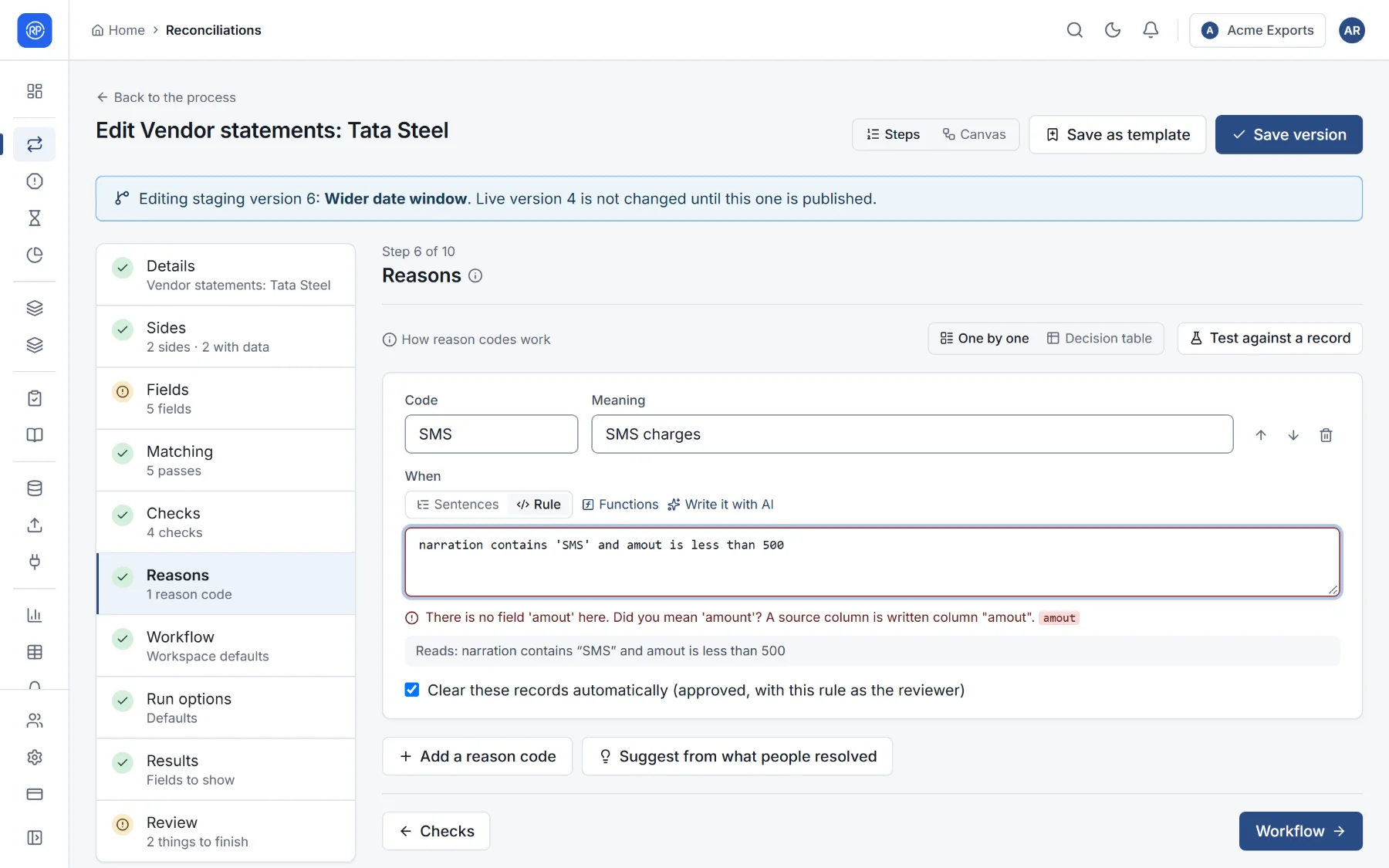
- A misspelt field: There is no field ‘amout’ here. Did you mean ‘amount’?
- A table or column that does not exist.
- A number compared with text, or a value where a condition is needed.
When it is right, you see Checked: no problems, and the rule is rewritten the one standard way.
Trying a rule
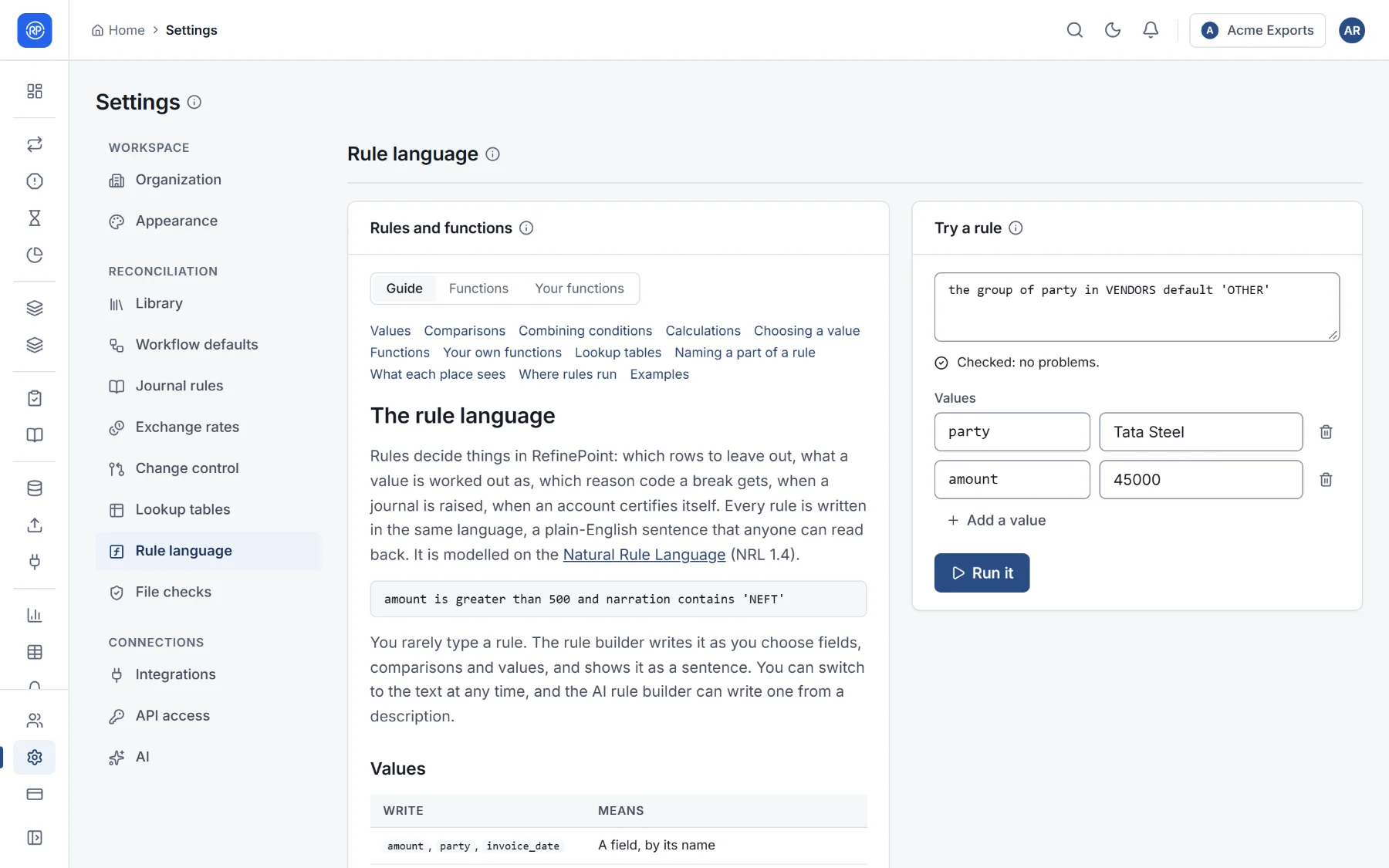
Section titled “Trying a rule”Settings → Rule language has the full guide, every function, and Try a rule: type a rule and some values, then Run it to see the result, lookup tables included.
In reason codes, Test against a record tries rules on a real record. See Reason codes.
Examples to copy
Section titled “Examples to copy”| You want | Write |
|---|---|
| Small SMS charges | narration contains 'SMS' and amount is less than 500 |
| Entries from October | date is between '2026-10-01' and '2026-10-31' |
| A missing party | party is not present |
| A clean reference | [upper case] [remove spaces from] reference |
| Amount from debit and credit | column "Credit" - column "Debit" |
| A vendor’s group, or OTHER | the group of party in VENDORS default 'OTHER' |
| A priority band | if amount is greater than 100000 then 'HIGH' otherwise 'NORMAL' |
| Names that are alike | [similarity of] party and payee is at least 0.85 |
| A weekend posting | date is a weekend |
| A valid GSTIN | gstin is a valid gstin |