
Matching
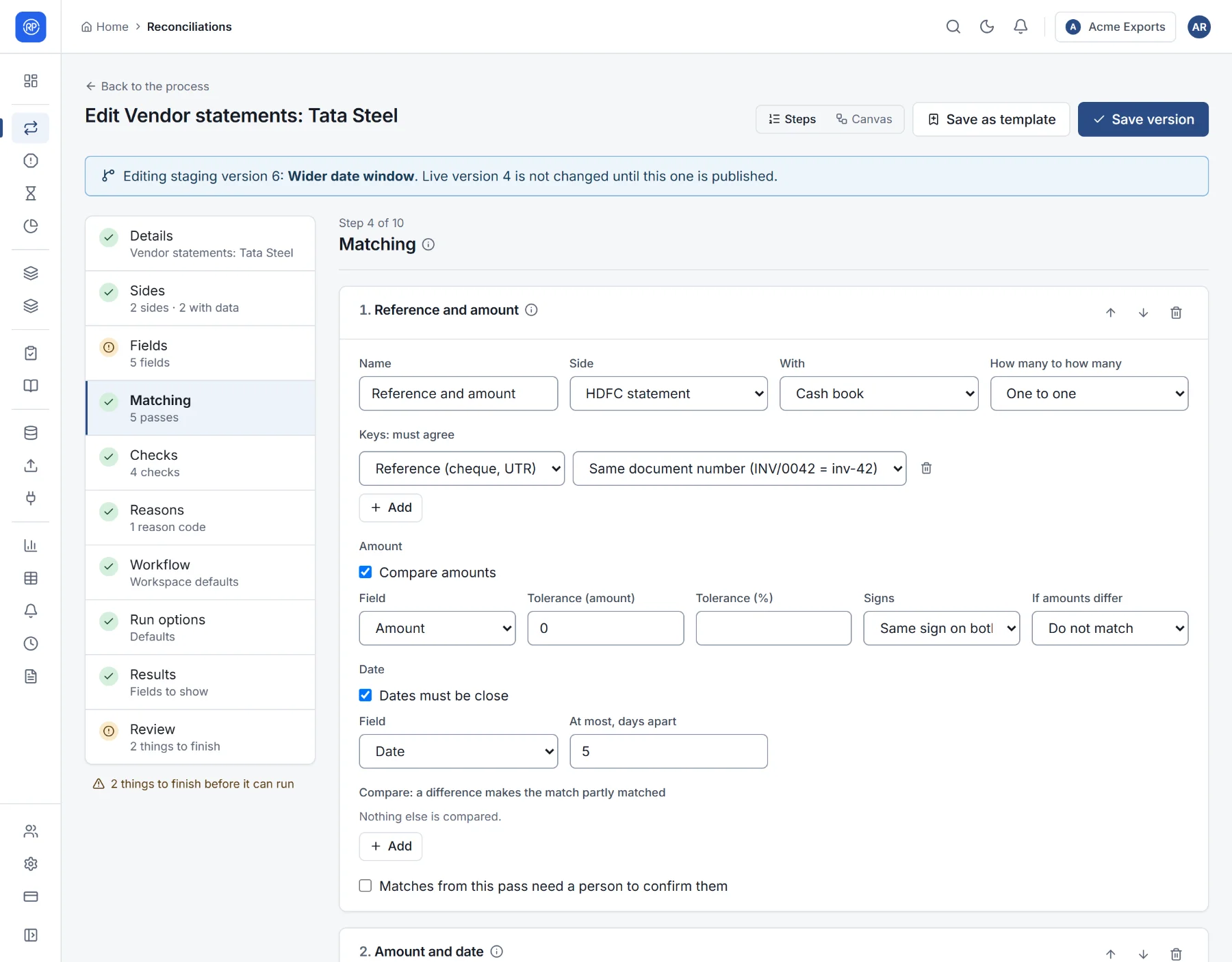
Matching is how RefinePoint decides that a line on the bank statement and a line in the cash book are the same payment. It is set up in step 4 of the designer as a list of matching passes.
Passes, in order
Section titled “Passes, in order”A pass is one way of pairing records. Passes are tried in order, strictest first, and each pass only looks at the records that earlier passes left unmatched. A typical bank reconciliation:
- Reference and amount: same cheque or UTR number and same amount. Most records match here, with certainty.
- Amount and date: no usable reference, but the same amount within a couple of days.
- One deposit for several receipts: a single bank credit equals several cash book entries added together.
- Amount within a week: a last, looser try.
Put the most reliable pass first. If a loose pass came first, it could pair records that a strict pass would have paired correctly. Use the arrows to reorder passes.
A pass’s settings
Section titled “A pass’s settings”| Setting | Meaning |
|---|---|
| Name | Shown in results, so people know why two records were matched. |
| Side and With | Which two sides this pass pairs. With three or four sides, add a pass for each pair that should be connected, for example Orders with Gateway, then Gateway with Bank. |
| How many to how many | One to one: one record on each side. One to several: one record matches a group on the other side whose total agrees (one bank credit for several receipts). Several to one: the reverse. Several to several (totals): groups on both sides whose totals agree. |
| Most records on the “several” side | For one-to-several matching: how many records may make up the group, from 2 to 12. Each record is matched with the smallest set whose total agrees. |
Keys: what must agree
Section titled “Keys: what must agree”Keys are the fields that must agree for two records to be paired: usually a reference. For each key, choose how values are compared:
| Comparison | Treats as equal | Example |
|---|---|---|
| Exactly equal | Only identical values | INV-0042 = INV-0042 |
| Equal, ignoring case | Upper and lower case alike | inv-0042 = INV-0042 |
| Equal, ignoring spaces and punctuation | Letters and digits only | INV / 0042 = INV0042 |
| Same document number | The same number however it is written | INV/0042 = inv-42 |
| Same GSTIN | The same tax ID | — |
| Same date | The same day, whatever the time | — |
| One contains the other | One value inside the other | UTR123 in NEFT/UTR123/SHARMA |
| One starts with the other | — | — |
| Similar text (percent) | Text alike to at least a percentage | Tata Steel Ltd ≈ TATA STEEL |
| Similar names (Jaro-Winkler) | Names alike, tolerant of spelling | Patel & Sons ≈ Patel and Sons |
| At most N typing differences | Up to N letters different | Sharma ≈ Shamra with 2 |
| Sounds alike | Names that sound the same | Reddy ≈ Reddi |
| Numbers within a percent | Numbers close in relative terms | — |
A pass with no key pairs records on amount and date only. That is useful for entries without references, but choose its tolerances carefully.
Amount
Section titled “Amount”- Tolerance (amount) and Tolerance (%): how far apart amounts may be and still match, for example ₹1 for rounding, or 2% for gateway fees.
- Signs: Same sign on both (money in on both sides), Opposite signs (a receivable against a payable), or Ignore the sign.
- If amounts differ by more than the tolerance: Do not match, or Match as partly matched — pair them anyway and show the difference, so someone looks at it.
At most, days apart: how far the dates may be apart. A cheque deposited on the 30th may clear on the 2nd.
Compare
Section titled “Compare”Fields listed under Compare do not stop records from matching, but a difference makes the match partly matched. For example, match on reference and amount, and compare the party name: a different name shows up for review without breaking the match.
Matched, partly matched, unmatched
Section titled “Matched, partly matched, unmatched”After a run, every record ends up as one of:
| Result | Meaning |
|---|---|
| Matched | Paired, and everything compared agrees. |
| Partly matched | Paired, but something differs: the amount (when allowed), the date, or a compared field. Someone should look. |
| Unmatched | No pass found a partner. It is on one side only. |
| Duplicate | The same record appears more than once on a side. |
Partly matched, unmatched and duplicate records are breaks: see Breaks. Breaks with a known explanation can be cleared automatically with reason codes.