
Bank feeds
A bank feed brings your bank’s transactions into RefinePoint without downloading or uploading statements. Each bank account becomes a data source with the same columns as an uploaded bank statement (Date, Value Date, Amount, Currency, Reference, Description, Counterparty, Type, Account). Your bank statement templates and reconciliations work on it unchanged. Refreshing adds only new transactions, never duplicates.
Bank feeds are in Data → Connections → Bank feeds. Only workspace admins can connect a bank, and bank feeds need a plan that includes them.
Which option for which country
Section titled “Which option for which country”| Where your bank is | Use | How you approve |
|---|---|---|
| UK and Europe | GoCardless Bank Account Data, over 2,000 banks | You go to your bank’s own page and approve read-only access |
| US, Canada, UK, Europe | Plaid | A Plaid window opens and you sign in to your bank |
| India | Account Aggregator | You approve in your Account Aggregator app |
| Many other countries (Asia, Latin America, Middle East, Africa) | Salt Edge | You sign in on Salt Edge’s page |
| Anywhere in the world | Files from your bank | Your bank sends statement files; see below |
Choose the country first. RefinePoint shows the options that cover it, and greys out any option the administrator of your RefinePoint server has not set up yet, with what is missing.
Connect a bank
Section titled “Connect a bank”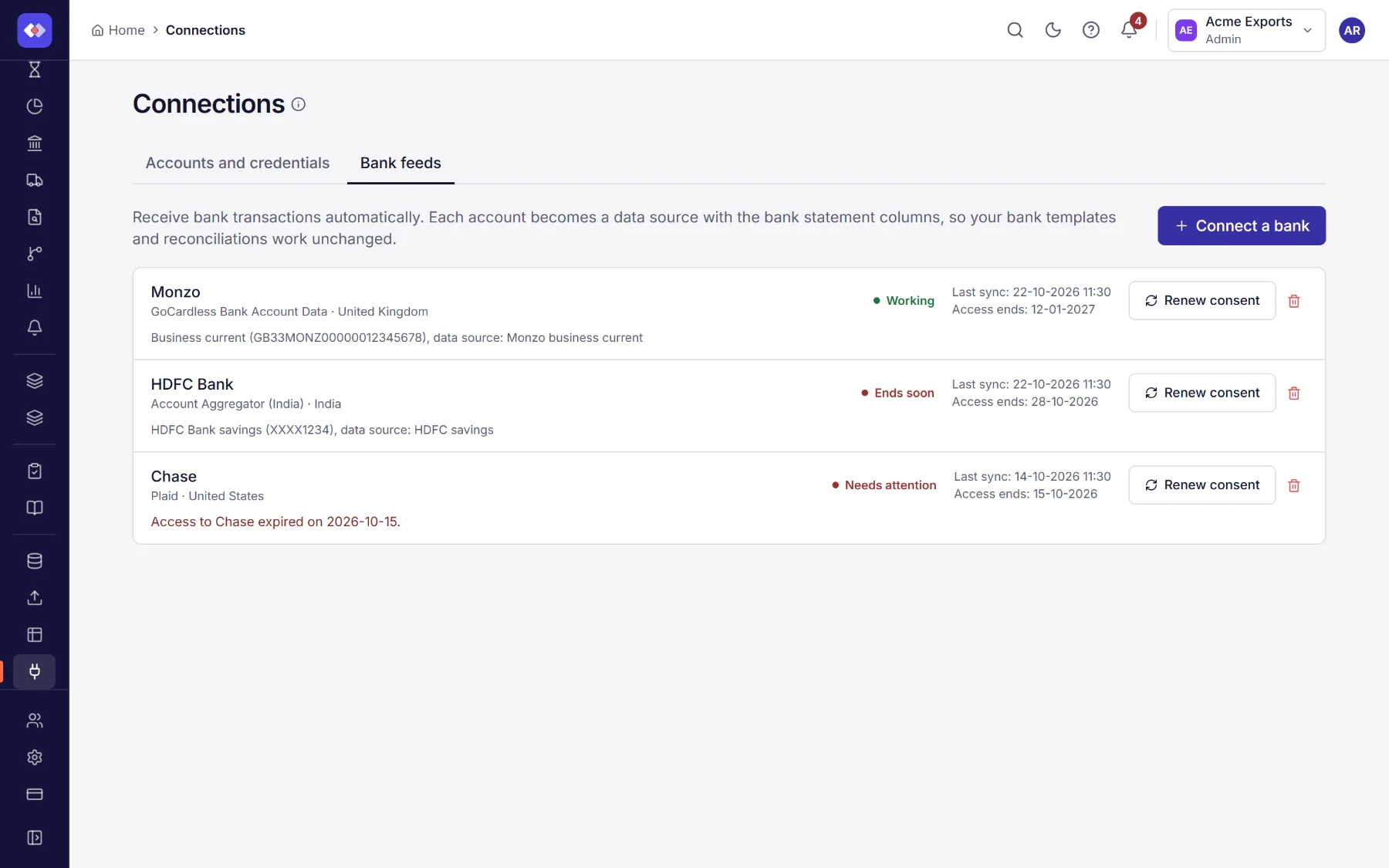
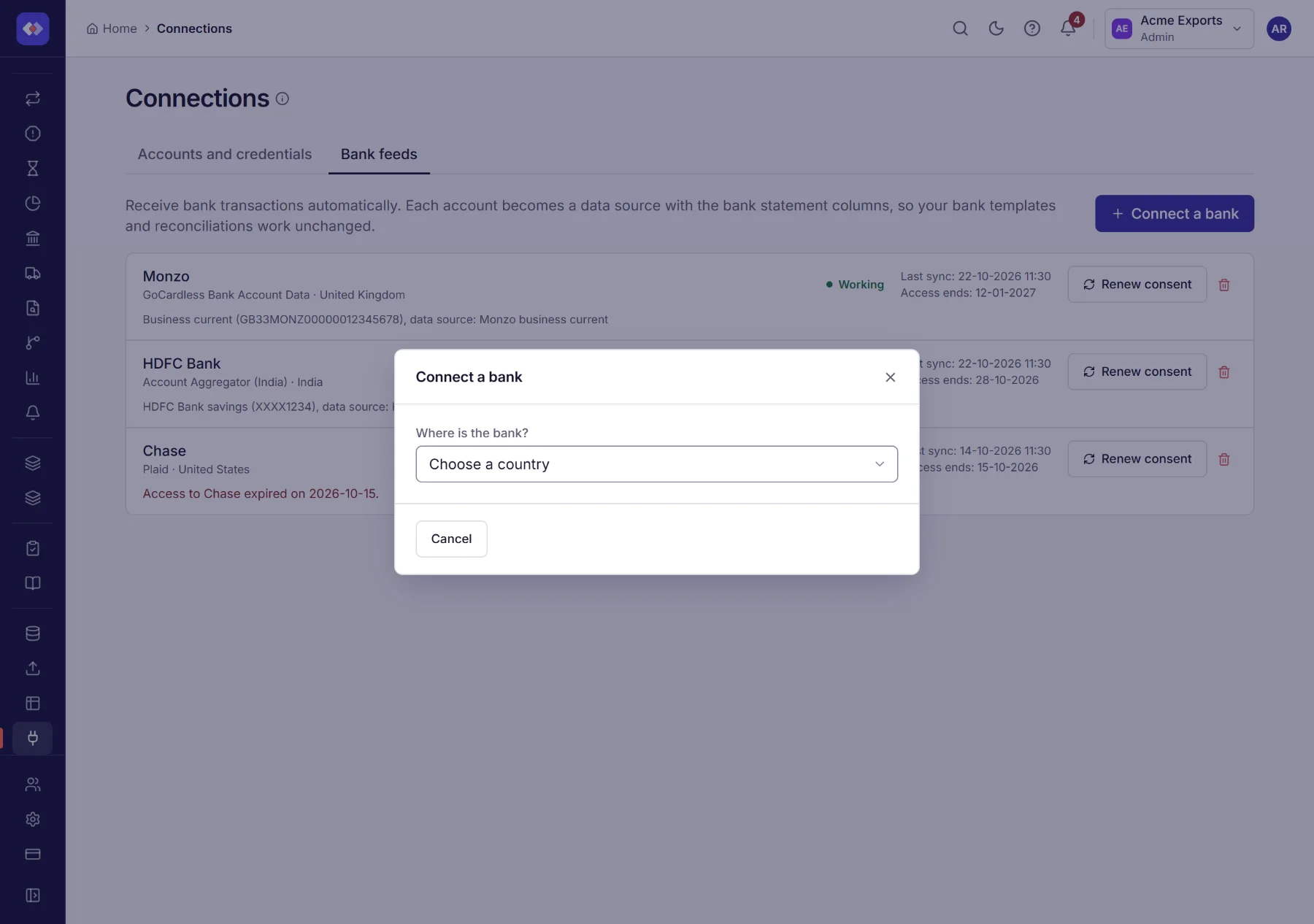
- Open Connections → Bank feeds and choose Connect a bank.
- Choose the country, then how to connect.
- Choose your bank if the option asks for it, then Continue.
- Approve access (see below). You come back to RefinePoint.
- Choose the accounts to bring in. Each becomes a data source, and its transactions are read straight away.
RefinePoint can only read transactions. It cannot move money.
India: Account Aggregator, in plain words
Section titled “India: Account Aggregator, in plain words”India has a national system, regulated by the RBI, that lets you share your bank data with a company you trust without giving it your bank password. The service in the middle is called an Account Aggregator (for example Finvu, OneMoney or CAMS Finserv). Your bank is one of the banks that take part.
- Enter the mobile number registered with your bank. RefinePoint sends a consent request for your account statements.
- Open your Account Aggregator app on your phone (or the approval page RefinePoint shows). You see what is asked for: transactions for a period, and for how long.
- Choose the bank accounts to share and approve. RefinePoint waits on its page and moves on by itself.
- Each refresh reads the new transactions through the aggregator.
You are in control: you can stop sharing in your aggregator app at any time, and the feed then shows Needs attention. A consent lasts up to a year, and the feed warns you a week before it ends.
Keeping a feed working
Section titled “Keeping a feed working”Every bank feed shows when it was last refreshed and when access ends. Banks and regulators limit how long a consent lasts (often 90 days in Europe, up to a year in India).
- A week before access ends, you get an alert, and the feed is marked Ends soon.
- When access has ended, or you stopped sharing at your bank, the feed shows Needs attention and refreshes fail with a message saying why.
- Choose Renew consent and approve again. The feed keeps working on the old consent until the new one is approved, and your accounts, data sources and history stay as they are.
Banks also limit how often they can be asked, so a feed may show the transactions already received when you refresh twice in quick succession.
Refreshing
Section titled “Refreshing”A bank feed data source refreshes like any other connected data source: with Refresh now, before every reconciliation run, and on a schedule. If a refresh fails, the data source keeps the transactions it already has.
Files from your bank (any bank)
Section titled “Files from your bank (any bank)”Every bank in the world can send statement files, so this always works, with no provider to set up:
- SFTP. Your bank (host-to-host) or your treasury system drops a file in a folder each day. Use an SFTP folder connector or the hosted SFTP inbox with file routing to pick it up.
- Upload. Download the statement from your bank’s website and upload it to a data source.
RefinePoint reads SWIFT MT940, MT950 and MT942, ISO 20022 camt.053, OFX/QFX and BAI2 (the format US banks send), and puts them in the same columns as a bank feed. Start a data source from the matching template so only files in that format are accepted.
For administrators
Section titled “For administrators”A provider appears as unavailable until its keys are set in the environment of the data source service. The names are
listed in the data source service’s README: GOCARDLESS_SECRET_ID and GOCARDLESS_SECRET_KEY; PLAID_CLIENT_ID,
PLAID_SECRET and PLAID_ENVIRONMENT; SETU_AA_CLIENT_ID, SETU_AA_CLIENT_SECRET, SETU_AA_PRODUCT_INSTANCE_ID,
SETU_AA_ENVIRONMENT and SETU_AA_WEBHOOK_SECRET; SALTEDGE_APP_ID and SALTEDGE_SECRET. Extra providers can be
added as plugins.