
Refreshing and keeping in sync
A data source with a web link (a Google Sheet, a pre-signed link, Dropbox) or a connected system (an accounting system, database, SFTP server…) can be fetched again, so reconciliations use the latest figures. That happens in three ways: when you choose Refresh now, on a schedule (Keep in sync), and before every reconciliation run. A copy the same as the last one is not stored again.
Uploaded files are not refreshed: upload the new file, or let file routing bring it.
Refresh now
Section titled “Refresh now”Refresh now is on every refreshable data source in Data → Data sources, on its records page, and in its Sync settings.
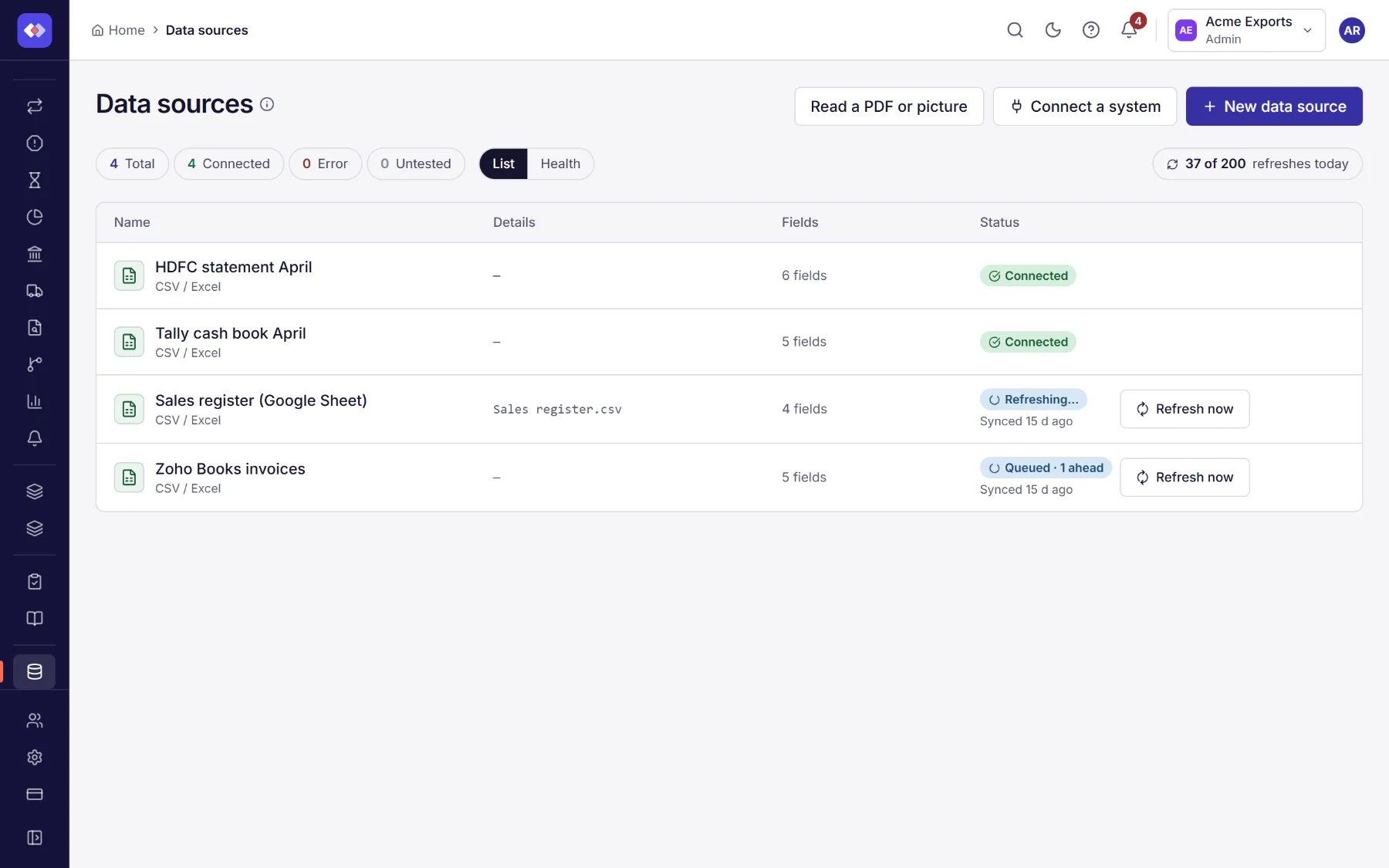
Refreshes wait their turn in a queue:
- One refresh at a time per data source. If a refresh of it is already waiting or running (because someone else chose Refresh now, its schedule came round, or a run needed it), yours joins that one: the data is fetched once and everyone who asked is told.
- The Status column shows where it is: Queued (with how many refreshes are ahead of it) or Refreshing…, then the data source’s status again. A refresh that failed shows Refresh failed; hover over it for the reason.
- You can carry on working. When it is done you get a notification: up to date (new data stored, or nothing had changed) or could not be refreshed, with why.
- Each refresh has a time limit of a few minutes. A system that answers too slowly is stopped, and the notification says so: try again later.
- A data source is fetched at most once a minute, whoever asks. Choosing Refresh now, a schedule coming round or a run starting less than a minute after the last fetch uses that fetch instead: you see Already up to date, and it does not count against your refreshes. A refresh that failed can be tried again at once.
The list shows when each data source last got data under its status: Synced 5 min ago for a web link or a connected system, Uploaded 2 d ago for a file.
How syncs and refreshes run
Section titled “How syncs and refreshes run”Scheduled syncs are jobs that RefinePoint runs at their time; each one asks for a refresh in the same queue as Refresh now and waits for it. The fetch itself is done by the data source’s own workers, a few at a time, taking turns between workspaces so one busy workspace cannot hold up the others.
Refreshes a day
Section titled “Refreshes a day”Each person may choose Refresh now a number of times a day, set by the workspace’s plan. The count is shown above the list (37 of 200 refreshes today) and resets at midnight UTC.
| Plan | Refreshes a day, per person |
|---|---|
| Free | 10 |
| Starter | 50 |
| Growth | 200 |
| Professional | 1,000 |
| Enterprise | Unlimited |
A licence may set its own number. These do not count: scheduled syncs, the fetch before a run, the first fetch of a data source you just created, and choosing Refresh now again while your own refresh is still waiting or running. When you have used them all, Refresh now is unavailable until the next day; syncs and runs carry on.
When you reach 80% of your refreshes for the day, you get a notification saying how many are left, once a day.
Keep in sync
Section titled “Keep in sync”In a data source’s Edit page, Sync fetches it again on a schedule: every 5, 10 or 60 minutes, as often as the plan allows. It shows when it was last fetched, whether anything changed, and when the next sync is.
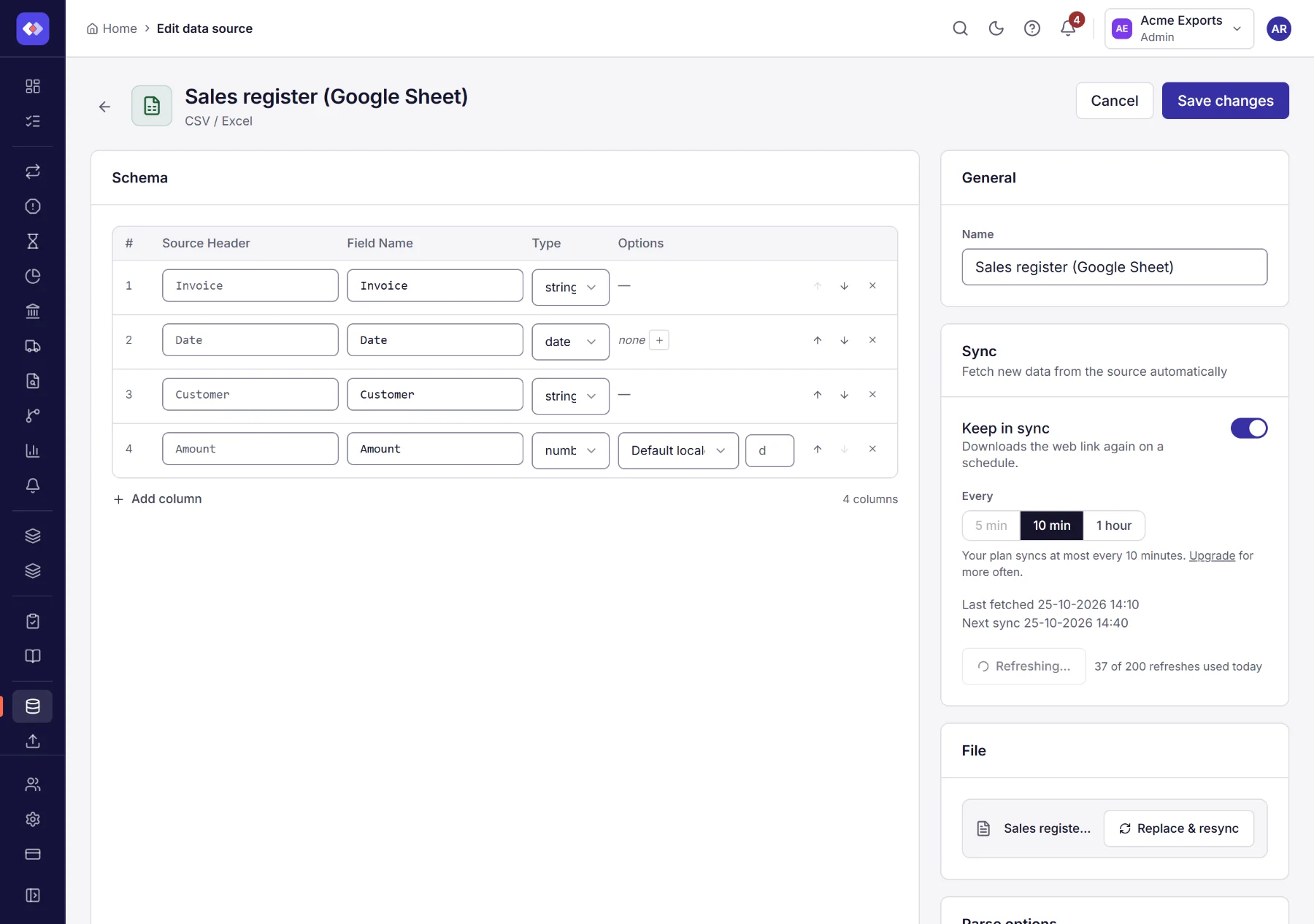
Keeping data sources in sync needs a plan with Data source sync. Each sync is a job under Scheduled jobs, with its history; a sync the plan no longer allows is paused there, with the reason.
Before every run
Section titled “Before every run”A refreshable data source is fetched again before each reconciliation run reads it, so a run never uses an out-of-date copy. The run waits for the refresh (joining one already under way). If the fetch fails, the run fails with the reason instead of using old data.