
Data quality rules
A data quality rule is a condition every row of a data source must meet: amount is not empty, invoice date is a date, GSTIN is a valid GSTIN. Rules are checked whenever rows come in, so a bad row is caught before a reconciliation can use it.
What happens to a row that fails
Section titled “What happens to a row that fails”Each rule is an Error or a Warning.
| Severity | The row |
|---|---|
| Error | Goes to error records and is left out of the data. Reconciliations, the records view and exports do not see it until someone releases it. |
| Warning | Is used as normal and is flagged with the rule’s message in the records view. |
After every upload, refresh or file that arrives by routing, a one-line summary shows what was read, for example 1,240 rows read · 12 to error records.
Adding rules
Section titled “Adding rules”Open a data source, then the Rules tab, and choose Add a rule. Pick a preset and a column:
- Required column: the value is not empty.
- Must be a number or Must be a date.
- Allowed values: the value is one of a list.
- Number in a range: between two numbers, both included.
- Unique key: no two rows have the same value. Every row sharing a value fails.
- Matches a pattern: a regular expression finds a match.
- Valid GSTIN: a well-formed GSTIN.
- Write my own: any condition in the rule language, for example
amount is greater than 0 and invoice_date is on or before today.
Give the rule a name and the message people see on a failing row. A rule can read any column by its heading, in any
case; a heading with spaces goes in double quotes, such as "Invoice Date".
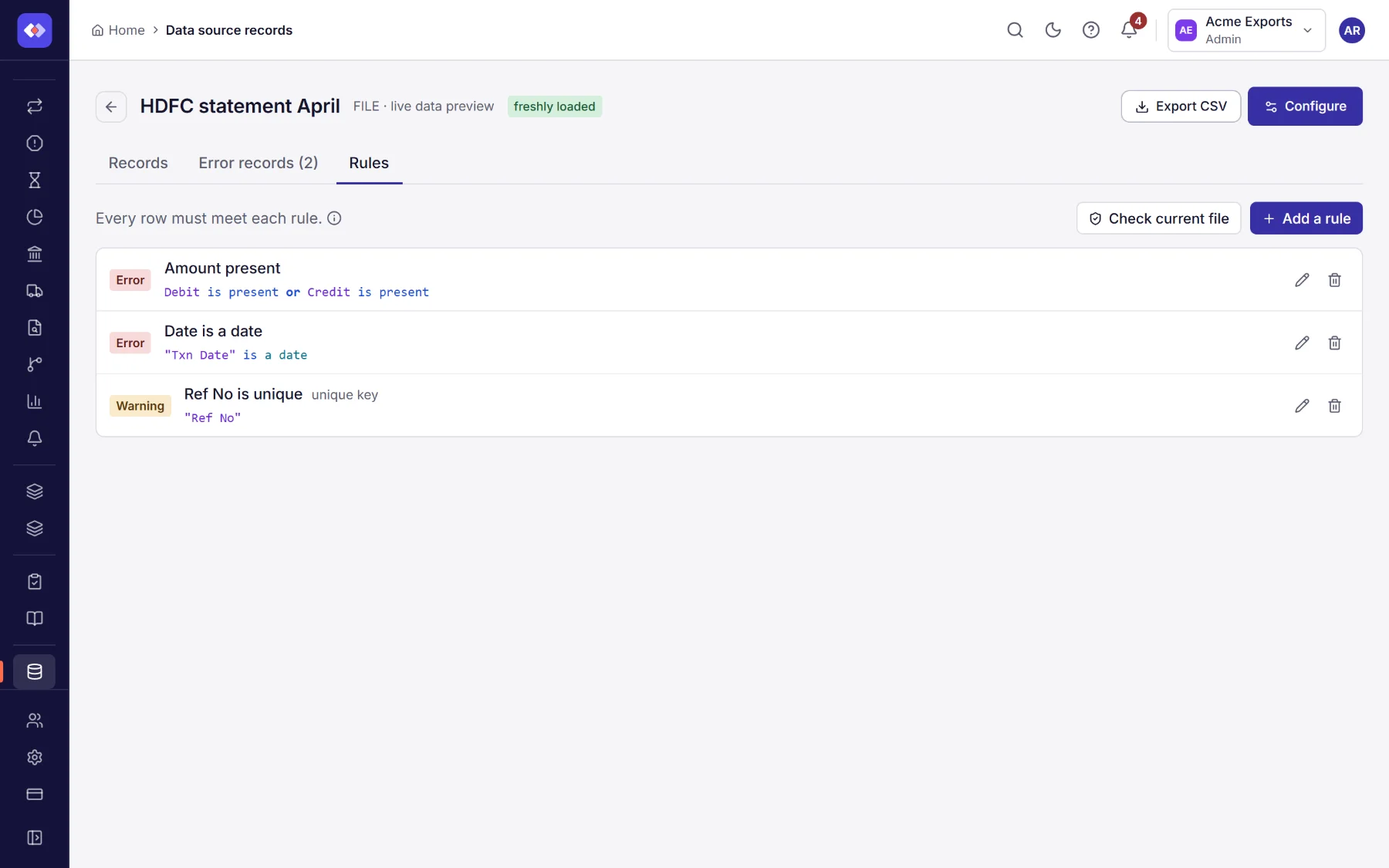
A new or changed rule applies to files that come in after it. To apply it to the file you already have, choose Check current file.
Working error records
Section titled “Working error records”The Error records tab shows the rows waiting, with the rules each failed and why.
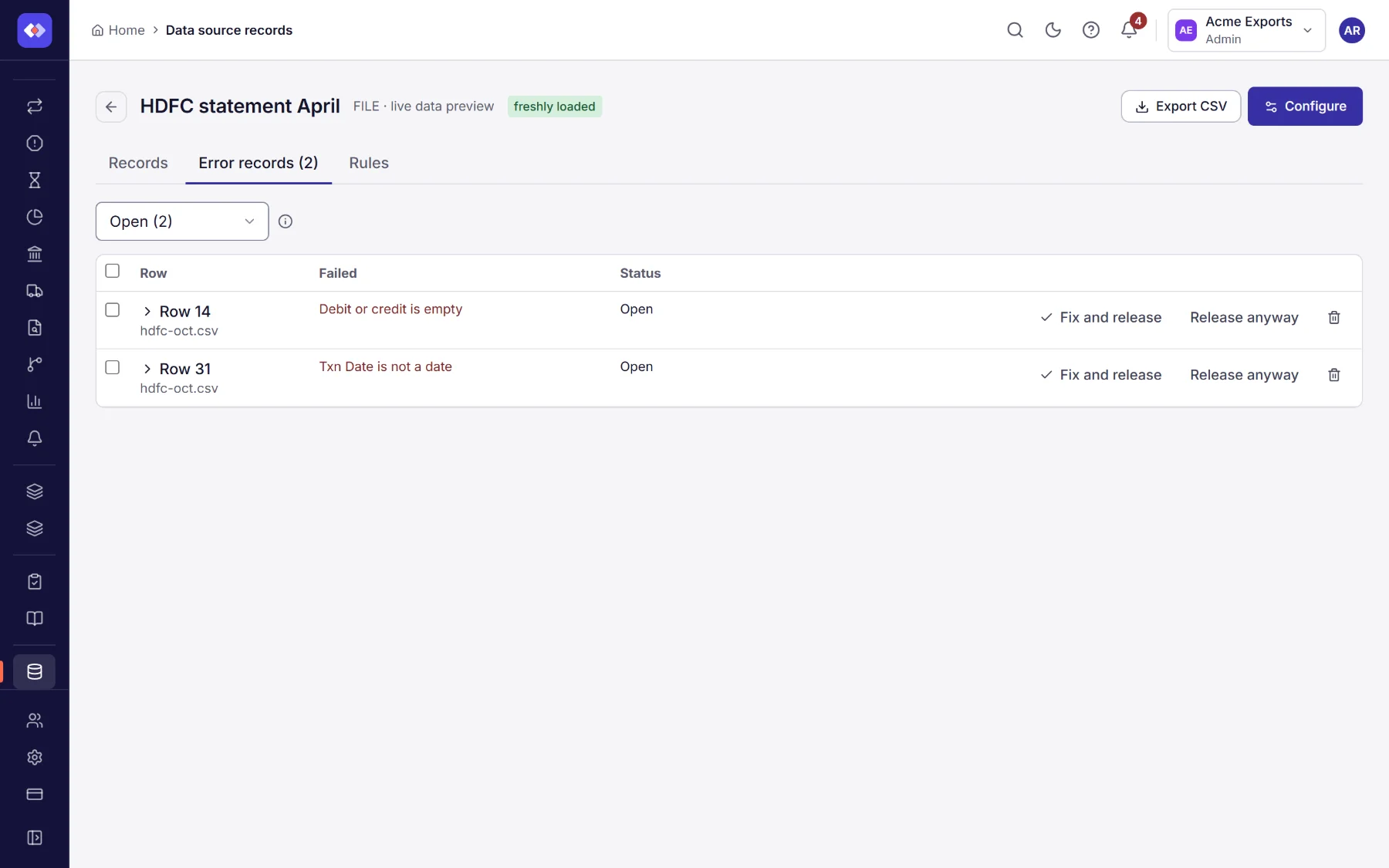
Open a row to see all its values and edit them. Then:
- Fix and release checks the row again against every Error rule. If it now passes, it is released into the data. If not, it stays and shows what still fails.
- Release anyway uses the row as it is. You must give a reason; it is recorded with your name and the time.
- Drop leaves the row out for good.
Tick several rows to fix, release or drop them together. Switch the list to Released or Dropped to see what was decided and by whom.
If the same file is read again (a web link or connected system is read again before every run), a row you already released or dropped keeps its decision, so you are not asked twice. A newer file replaces the older one, so only rows of the current file can be worked.
Working error records needs the Work error records permission; adding and changing rules needs Manage data quality rules (see Permissions).
How reconciliations use the data
Section titled “How reconciliations use the data”A reconciliation reads only the rows that were accepted: rows in error records (open or dropped) are not in its data, and released rows are used with the values you fixed. Warnings do not hold rows back.
A file that is wrong as a whole
Section titled “A file that is wrong as a whole”Data quality rules judge each row and set the failing ones aside, so the run goes ahead with the rest. A file that is wrong as a whole (a missing column, the wrong file) shows in the fields found when it is uploaded, and a run that cannot read a side fails with the reason in the reconciliation’s History.